My SSL Certificate Isn't Working
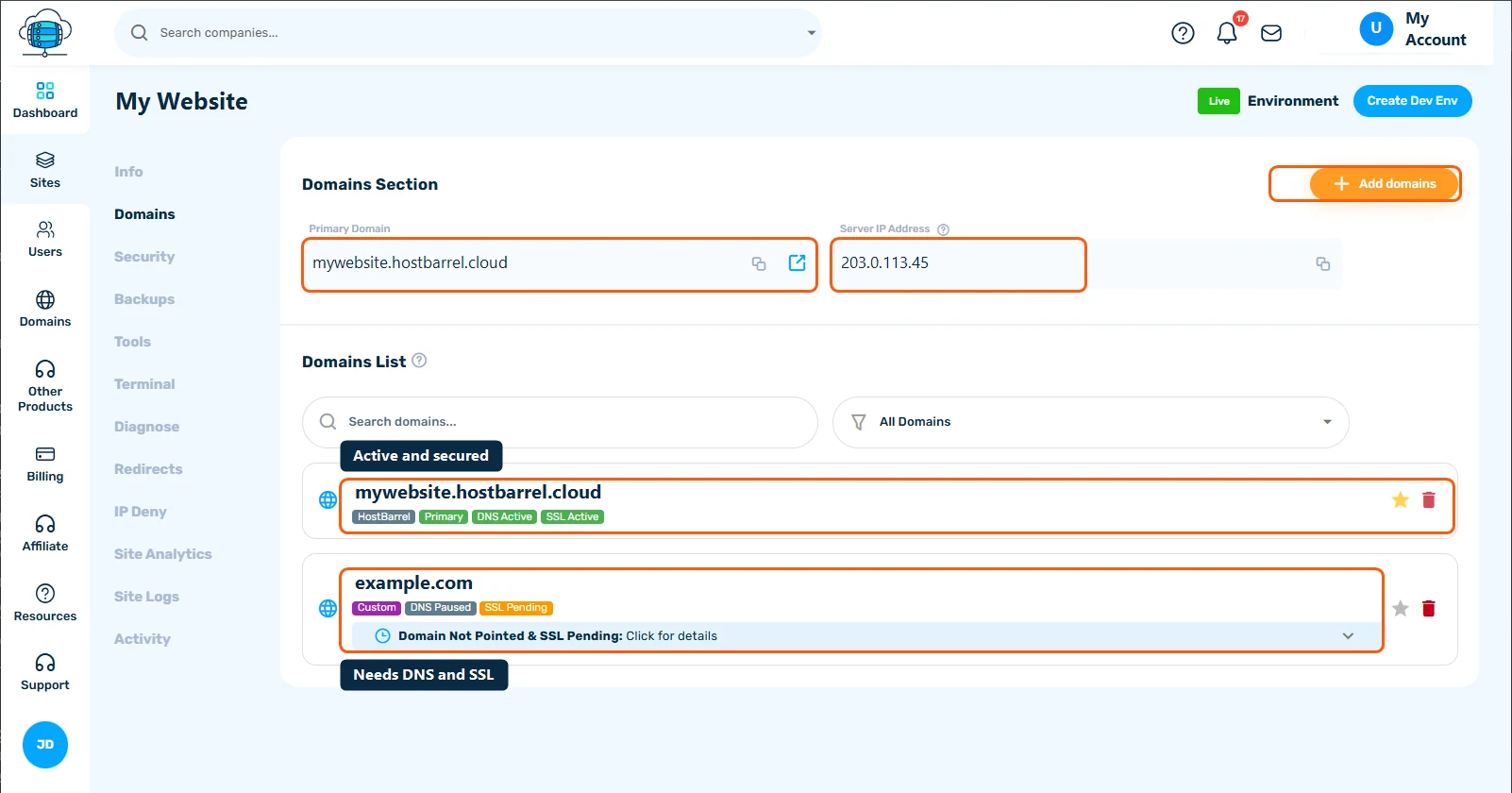
Most SSL problems on HostBarrel mean the certificate hasn't been issued yet because the domain doesn't point to us. Check the SSL badge in your site's Domains tab: if it says SSL Pending, fix the domain's DNS first and the certificate follows automatically.
Why does my site say "Not Secure"?
Your browser shows "Not Secure," a certificate warning, or a padlock with a warning icon instead of a clean https:// address. What you see narrows down the cause:
- A full-page warning such as "Your connection is not private" - the browser doesn't accept the certificate at all. It may not be issued yet, may be for a different name, or may have expired.
- "Not Secure" in the address bar with no warning page - the page loaded over plain
http://, or over HTTPS with some insecure content on it. - A padlock with a warning icon - the certificate is fine, but the page still loads some files over HTTP (mixed content).
Clicking the padlock or warning icon in the address bar shows the certificate's name and expiry date, which helps confirm which case you're in.
What causes SSL certificate errors?
- SSL hasn't finished issuing yet because DNS is still pointing elsewhere. A certificate can only be issued once the domain reaches HostBarrel.
- Your domain's badge shows SSL Pending or SSL Failed in the Domains tab, or its DNS badge shows DNS Paused
- You're visiting a name that isn't on the site, for example
www.yourdomain.comwhen onlyyourdomain.comwas added. Thewwwversion is not added for you: it is a separate entry in the Domains tab, and the certificate doesn't cover a name the site doesn't know about. - The page loads over HTTPS but still pulls some images, scripts, or styles over plain HTTP (mixed content)
- You recently changed domains or DNS and a new certificate hasn't caught up yet
- A custom certificate you installed yourself has expired, or was pasted without its certificate chain. Free certificates renew automatically; a custom certificate is only valid until the expiry date it was issued with.
What should I check first?
- Open your site's Domains tab and check the SSL status badge - if it says SSL Pending or SSL Failed, open the domain's details (Click for details) to see what's still needed
- Confirm DNS is fully pointed to HostBarrel first - SSL can't issue until it is (see How to Point Your Domain to HostBarrel)
- Check that every version of the address your visitors use, with and without
www, is listed in the Domains tab. Add any missing one with Add domains.
What should I try next?
- If the padlock shows but with a "mixed content" warning, see Fixing Mixed Content Warnings After Installing SSL for how to find and fix HTTP resources on an HTTPS page
- Give it a little time after DNS verifies - the certificate is issued after the domain verifies, usually within a few minutes
- If the badge says SSL Failed and DNS is verified, click Retry SSL Generation in the domain's details
- If visitors can still reach the site over plain
http://, check that Force HTTPS is on in the Security category of your site's Tools tab - If you installed a purchased certificate with Add Custom SSL (on the SSL Certificate card in the same Security category), check its expiry date and that you pasted the certificate chain as well as the certificate. A custom certificate is not renewed for you: when it nears expiry, install the renewed certificate from your provider the same way. See Activating a Purchased SSL Certificate (CSR & Validation).
- If only one person sees the warning, check that the clock on their computer or phone is correct. A wrong date makes valid certificates look expired.
When should I contact support?
Contact Support if the badge still says SSL Pending more than an hour after your domain shows as verified, or if the warning appears on a domain whose badge says SSL Active. Include your domain name and a screenshot of the exact warning - certificate issues are usually quick for us to diagnose from our end.
How do I keep SSL working?
- Leave the domain pointed at HostBarrel, because automatic renewal needs the domain to keep reaching us
- Add both the
wwwand plain versions of your domain when you first set up the site - Use
https://addresses when you add images and links, so mixed content doesn't creep back in - Put a reminder in your calendar before a purchased certificate expires
