Activating a Purchased SSL Certificate (CSR & Validation)
To activate a purchased SSL certificate, open it under Other Products, click Set Up, enter the domain, generate or paste a CSR, and complete domain validation by DNS record or HTTP file. Once issued, install it with Add Custom SSL.
Do You Need This?
Sites hosted on HostBarrel get free SSL automatically - no activation needed. This guide is for purchased certificates (OV, EV, wildcard, or a DV cert for a site hosted elsewhere), which must be activated with the certificate authority before they can be used.
Starting Activation
Go to Other Products, find your SSL certificate, and click Set Up. The wizard walks you through three steps.
Step 1: Enter Your Domain
Type the exact domain the certificate should secure (for a wildcard, the base domain - e.g. example.com for *.example.com).
Step 2: The CSR
A CSR (Certificate Signing Request) tells the certificate authority what to issue. You have two options:
- Generate one for me - the wizard creates the CSR and private key. Download both immediately - the private key is shown only once. Without the private key, the issued certificate is useless and you'd have to reissue.
- Paste my own - if your server admin generated a CSR on the target server, paste it here (the private key then stays on that server, which is ideal).
Step 3: Domain Control Validation (DCV)
The certificate authority needs proof you control the domain. Choose a method:
- DNS - add the provided record at your DNS provider (or under Manage DNS if the domain is registered with us)
- HTTP file - upload the provided file to a specific path on your website
Review everything and submit. Issuance typically takes minutes for DV certificates; OV/EV take longer because the CA verifies your organization.
After Issuance
The certificate's detail page tracks its status - use Check Status Now to poll, or Change DCV Method if validation is stuck. Once issued, click Download to get the certificate and CA chain.
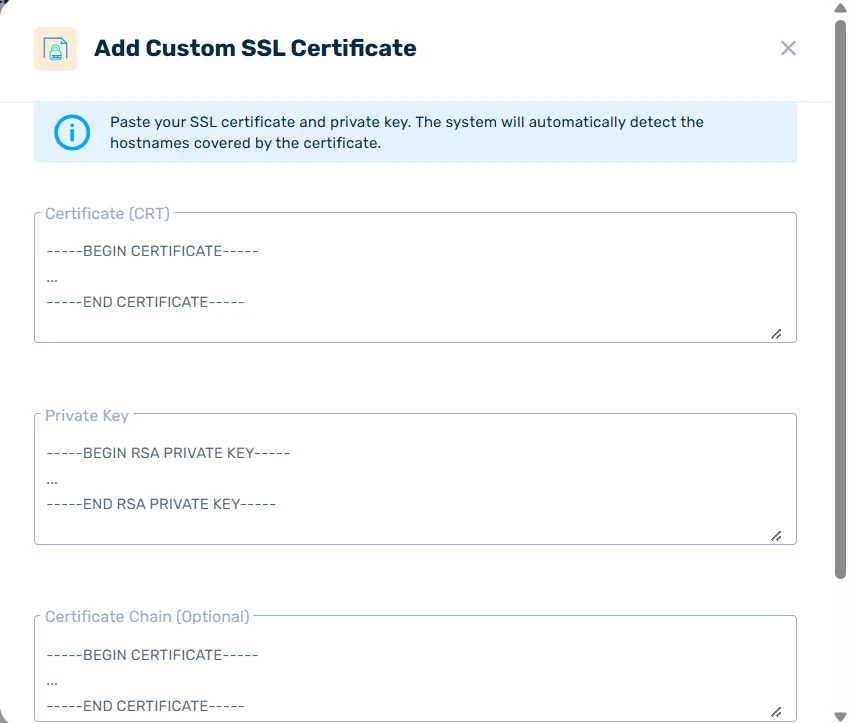
To install it on a HostBarrel site, open the site's Tools tab, go to the Security category, and use Add Custom SSL, pasting the certificate, private key, and chain. For sites hosted elsewhere, install it in that server's control panel.
Reissuing
Lost the private key, changed servers, or need different domains? Use Reissue on the certificate detail page to run activation again - it doesn't cost anything extra.
