How to Point Your Domain to HostBarrel
To point a domain to HostBarrel, add it to your site's Domains tab, then create the DNS records the dashboard shows at your domain registrar. Once the domain verifies, usually within a few hours, SSL is issued automatically.
Adding a Custom Domain
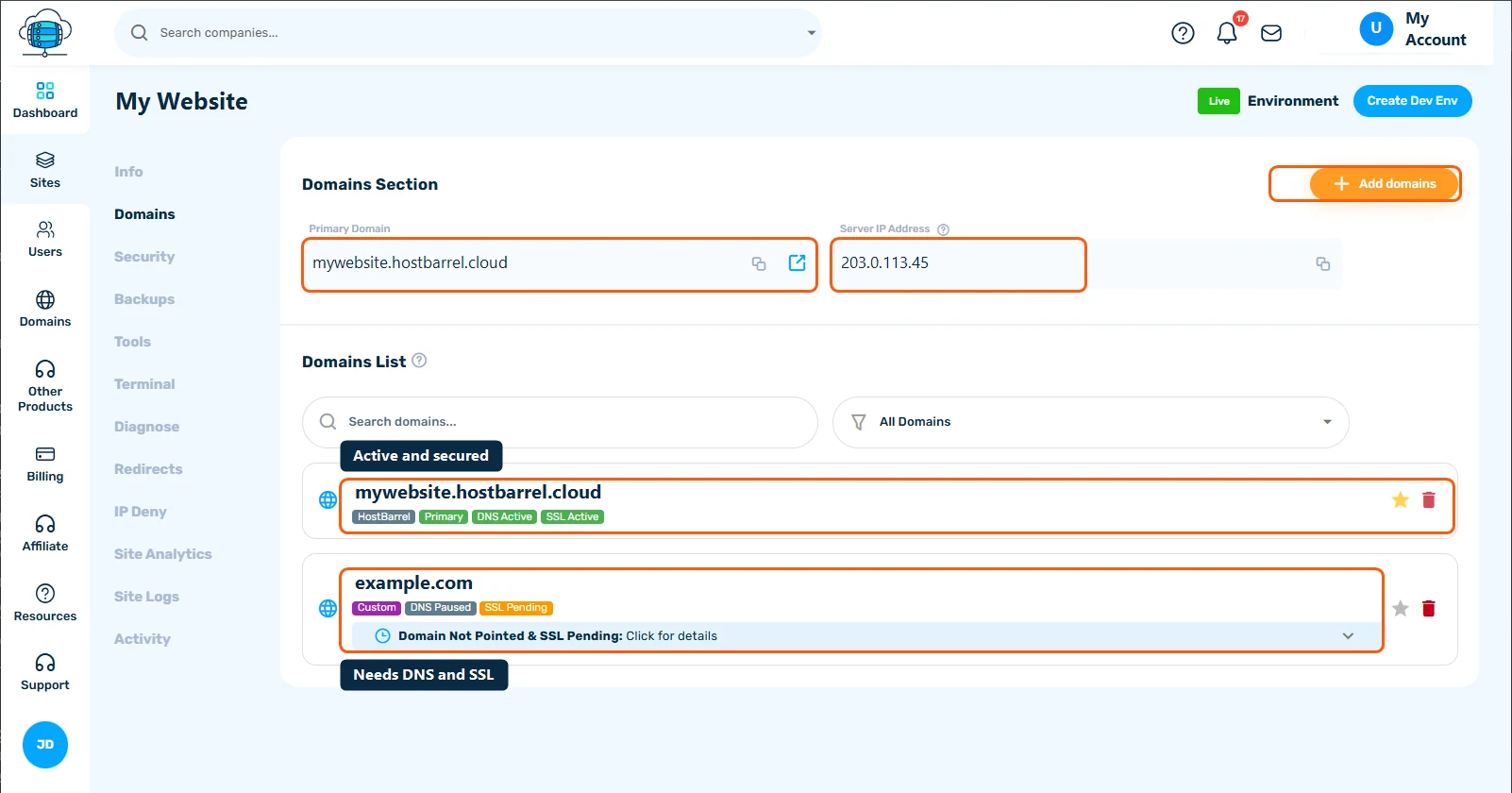
After creating a site on HostBarrel, you can add your own domain from the site's Domains tab. Click Add domains and enter your domain name.
Updating Your DNS
Log in to your domain registrar (wherever you purchased the domain - GoDaddy, Namecheap, Cloudflare, etc.) and update the DNS records to point to HostBarrel.
⚠️ Before You Continue
Changing your DNS records can affect your website and your email at the same time - if you use an email provider like Google Workspace or Zoho Mail on this domain, only change the records HostBarrel asks for, not your existing MX/TXT records. See Understanding and Managing DNS Records if you're not sure which records are which.
Step-by-Step
- In your site's Domains tab, note the Server IP Address - this is where your domain needs to point
- Log in to your registrar's DNS management panel
- Add an A record for the domain with that IP address as its value, as the setup guide shown after you add the domain describes
- Save your changes
Automatic SSL
Once your DNS records are pointing to HostBarrel, SSL will be provisioned automatically. You don't need to install or configure anything - it's handled by our platform.
Propagation Time
DNS changes can take 24-48 hours to propagate worldwide, though it often completes within a few hours. You can check propagation at whatsmydns.net.
How Verification Works
After you add a domain, HostBarrel checks automatically - every few minutes - whether it points to our servers yet. While it waits, the domain shows as Pending; if a check can't reach it, it shows as Failed. This is normal right after you've added the records - just give DNS time to propagate. Once the domain resolves to us, it flips to Verified and SSL is issued automatically.
If Your Domain Says "Paused"
To avoid checking a domain forever, HostBarrel stops the automatic checks after about a week if the domain still hasn't pointed to us. When that happens the domain shows as Paused - it's not an error, just a signal that we're waiting on you.
Once you've added the correct DNS records at your registrar, open your site's Domains tab, open the domain's details and click Check DNS again. That immediately resumes verification, and your domain will verify within a few minutes if the records are correct. You can click it as many times as you need.
- Pending / Failed - we're still checking automatically; no action needed beyond pointing your DNS.
- Paused - automatic checks stopped; click Check DNS again to resume.
- Verified - all set; SSL is issued automatically.
