My Domain Isn't Pointing to My Website
If your domain doesn't show your HostBarrel site, its DNS records almost always still point somewhere else or were added in the wrong place. Check the domain's badge in your site's Domains tab, fix the records wherever the domain's nameservers point, then click Check DNS again.
Why isn't my domain showing my website?
You've added a domain to your site, but visiting it shows your old host, a registrar parking page, or doesn't load at all. Adding a domain in your dashboard tells HostBarrel to expect it, but visitors only reach your site once the domain's DNS records send them here. Until then, browsers keep going wherever the records pointed before.
What stops a domain from pointing to my site?
- DNS records haven't been updated at your registrar yet, or were entered incorrectly. A single wrong character in a record value is enough.
- The records were changed in the wrong place. DNS is controlled wherever the domain's nameservers point. If your nameservers point to a service such as Cloudflare, changes at your registrar have no effect.
- An old record is still there. If the old host's A record, or an AAAA (IPv6) record pointing to it, is left alongside the new one, some visitors keep reaching the old server.
- DNS changes haven't finished propagating (can take up to 24-48 hours)
- The domain's status shows Paused because it's been unverified for about a week, so automatic checks have stopped
- The domain has expired and the registrar is showing its own parking page
What should I check first?
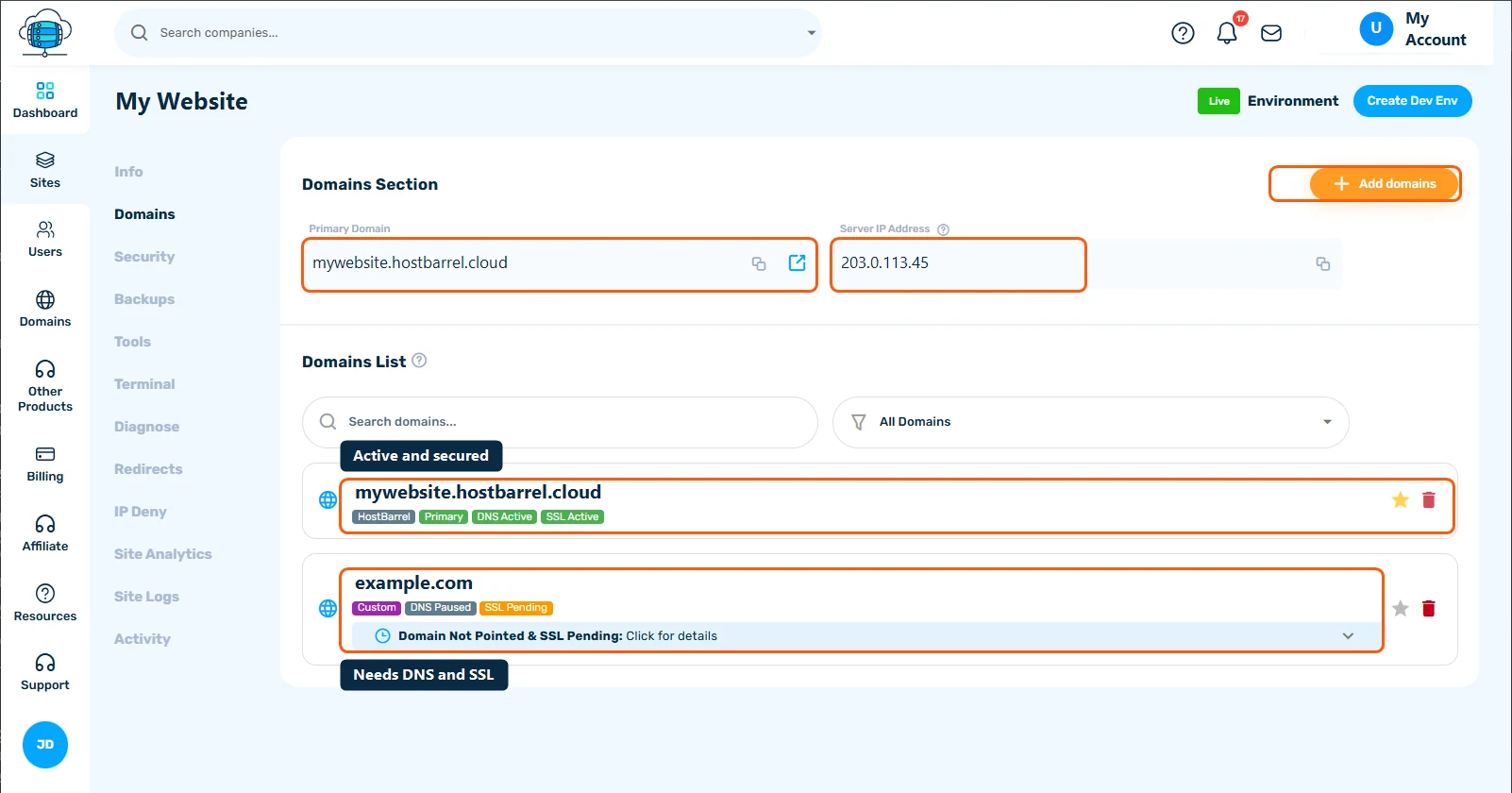
- Open your site's Domains tab and check the status badge next to your domain
- If it says DNS Paused, double-check your DNS records at your registrar match what HostBarrel shows, then open the domain's details and click Check DNS again
- If it says Pending DNS or DNS Failed, HostBarrel is still checking automatically every few minutes. Confirm the records are right, then give DNS time to propagate.
What should I try next?
- Check
whatsmydns.netto confirm your DNS change has actually propagated worldwide, not just for you. Compare the address it shows with the Server IP Address at the top of your site's Domains tab. - Use the same site's nameserver (NS) lookup to see which nameservers your domain uses. That tells you where its records must be edited.
- Make sure you edited DNS in the right place - if your domain is registered with HostBarrel or uses HostBarrel nameservers, add the records under Domains in the sidebar, in the domain's DNS records tab, not at another provider. See Understanding and Managing DNS Records.
- Delete leftover A or AAAA records that point to your old host for the same name, but leave MX and TXT records alone so your email keeps working
- Check the domain's expiry date with your registrar, or on the Domains page if it's registered with HostBarrel, and renew it if it has lapsed
How long should I wait?
DNS changes often show up within a few hours but can take 24-48 hours to reach everyone. If whatsmydns.net shows the correct address in most locations, you only need to wait. If it shows the old address everywhere several hours after the change, the records probably weren't saved, or were saved in the wrong place.
When should I contact support?
Contact Support if the records look correct and have propagated but the badge still won't verify, or if you're not sure which records to change. Include your domain name and which registrar it's with - we can check what we're seeing from our side and compare notes.
How can I make the next domain change smoother?
- Before you change nameservers, write down your existing records, especially MX and TXT, so you can recreate them at the new DNS provider
- A day before a planned move, lower the TTL on the records you will change. Changes then reach visitors faster.
- Renew your domain well before its expiry date, or set yourself a reminder
