Account-Wide Resources Walkthrough
The Resources page shows your combined requests, bandwidth, disk usage and site count across the whole account, measured against your plan's limits, plus which sites use the most.
Where to Find It
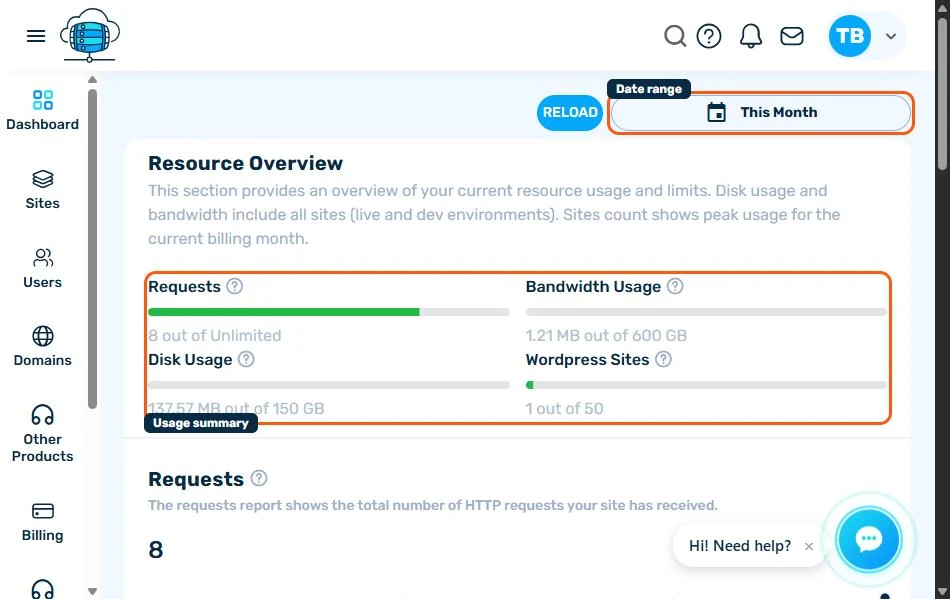
Click Resources in the sidebar for a combined view of usage across every site on your account, checked against your plan's limits. Switch the date range with This Month (top-right) to match your billing period, or pick a custom range.
The Four Numbers That Matter
- Requests - total HTTP requests across all sites (usually unlimited on hosting plans)
- Bandwidth Usage - data transferred out, measured against your plan's monthly allowance
- Disk Usage - combined storage across every site's files and database, including Dev environments
- WordPress Sites - how many sites you're running against your plan's site limit
Below the Summary
Each metric gets its own chart further down the page - a day-by-day trend line for requests, bandwidth and disk usage - plus a Top sites table for disk and bandwidth so you can see at a glance which site is using the most. If you're consistently near a limit, see Monitoring Site Analytics & Resource Usage for per-site detail and alert settings, or consider upgrading your plan.
