How to Cancel Your Hosting Plan
To cancel, go to Billing > Services, click Manage on the service and choose Request Cancellation. The service stays active until the end of the period you have paid for, and no further charges are made.
⚠️ Back Up Before You Cancel
Download your website files and databases before requesting cancellation - see Site Backups: Automatic, Manual & Downloadable. Once the account is terminated, data cannot be recovered.
How to Cancel
- Log in to your HostBarrel dashboard
- Go to Billing > Services
- Select the service you want to cancel and click Manage
- Click Request Cancellation
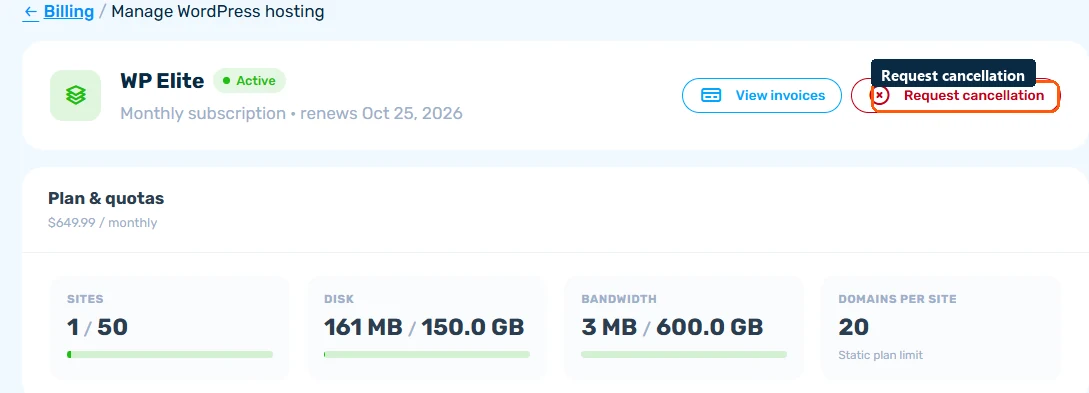
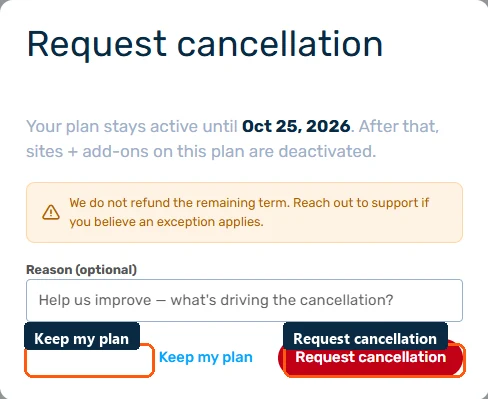
- Review the notice about your plan staying active until the end of the paid period, with no refund for the remaining term
- Provide a reason (optional) and confirm
End of Billing Period
If you choose to cancel at the end of the billing period, your service will remain active until the current paid period expires. No further charges will be made. All fees already paid are non-refundable.
Reactivation
Changed your mind? If your account hasn't been fully terminated yet, contact support to reactivate it. Data may still be recoverable for a short period after cancellation.
